int symmetry = 6; int angle = 360 / symmetry; float strokeSize = 9; // use + and – keys to change instead of slider float xoff; // press s to save // press c to clear to screen void setup() { size(600, 600); //background(200); colorMode(HSB, 100); noStroke(); } void keyPressed() { if (key ==…
Category: All Posts
Drawing Machine By: Braeden Daugherty
My drawing machine allows you to create lines that move around on there own around the page depending on how you draw them. you can switch between three different color patterns by key presses and when you are drawing the position of your mouse determines the color, so not only is their different patterns but…
Assignment 1 Updated – Ulysses Flores
For this assignment I wanted to test out different shapes and colors while making some transparent and similar to the background. I also used the if mouse pressed code to create the black square to change color as the mouse is pressed, also the stroke weights and background differ more than the actual fill of…
Processing Assignment 1 – Miles Shamo
I’m not sure this is the best experiment I’ve created in processing (the code is horrendous) but it fits best the idea of a drawing machine. Clicking and dragging your mouse spawns in various circles, the size largely determined by the speed of your mouse. These circles jitter around, trying their best to escape each-other. …
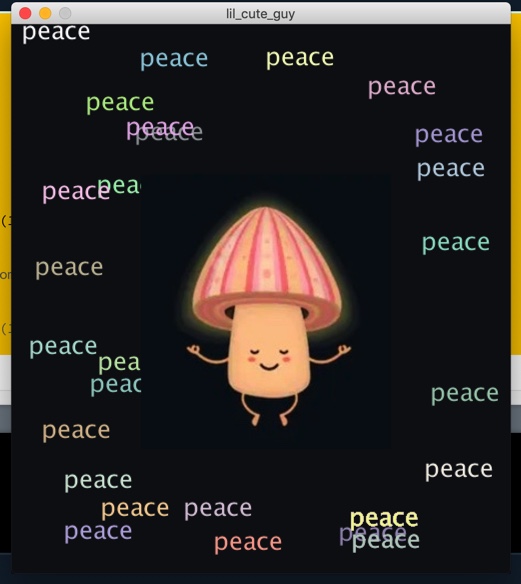
Assignment 1- Julianna Kowalczyk
Below is the code to the first assignment. PImage img; void setup() { size (500, 550); background (#0F1015); img=loadImage(“hi.JPG”); } void draw() { image(img, 130, 150); image(img, 130, 150, width/2, height/2); frameRate(4); if (mouseX>100); translate(mouseX, mouseY); textSize(25); text(“peace”, 10, 15); fill(random(150, 255), random(150, 255), random(150, 255)); } //<>//
Assignment 1-Hina Khalid
I started working on my assignment work by using some shapes. I used rectangle in for loop and used random function for different colors,Along with this I used variables to generate the small ellipse and used background function in the void setup() function so as the circles fill the screen.Im trying to make it more…
Second Sketch Assignment: Braeden Daugherty
These are the two pictures that you can get from my sketch that I call two face due to being able to draw two different pictures depending on certain keys pressed as well as using the mouse to change colors.
Processing Composition
I started this with the two basic shapes of a rectangle and an ellipse and implemented the random() function for the colors because I liked how that added a sort of graffiti look to the piece. My conditionals were if the mouse was pressed, draw a circle, and if the mouse was just simply…
Processing assignment 1 – Daniel Barrera
I knew I wanted to do something in space as soon as i saw what you can do with shapes in processing. here I have a blue planet, a sun, a black hole, a satellite, some UFOs (one of which can move around) and a lot of stars. something that you cant see is that…
Processing Assignment 1
For this first assignment I was just trying to practice writing the code with no mistakes and also getting used to the measurements and how the affect the placement of the shapes. It was actually pretty hard to get the placement right but I think I got a little better at understanding how they work…
Processing Assignment 2
For this assignment I experiment with using 3D shapes to create an image. I used the camera function in order to change the orientation of each box using the position of the mouse. I also wanted to incorporate 2D circles in the image so I randomized the position with each mouse click. In order to…
Processing Class Assignment
code: int pointX = 0; int pointY = 0; int ewidth = 0; int elength = 0; void setup(){ size(640,480); background(100,50,50); } void draw(){ stroke(200,0,0); strokeWeight(5); fill(1,200,1); stroke(106,13,170); rect(320,240,300,200); //rectangle stroke(0,200,200); strokeWeight(1); fill(1,1,200); stroke (random(200),random(200),random(200)); // random outline color of the ellipse ellipse(300 + pointX,260 + pointY,40 + ewidth,40 + elength); // creates a…