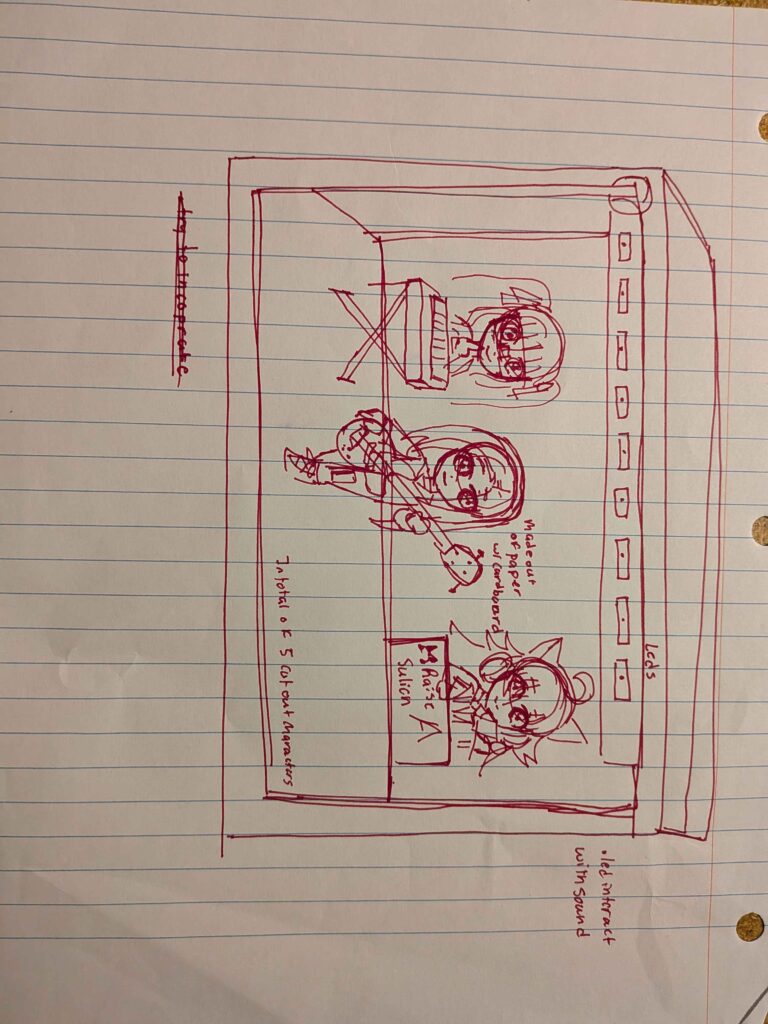
This project is inspired by the game Bang Dream Girls Band Party, where a band is on stage moving along with the music. I created a stage that features original characters. The stage has Bluetooth LD lights that sync with any device. It allows the lights to flash whenever music plays or flashes when people are talking. You are able to play with the settings in the app that is included with the connector of the LEDS. You can change the color of the LEDS without using the music feature of the app. I also included a separate LED strip to show case the characters colors that fade in and out with each other. The motors move every 3 seconds to the song. It creates an immersive atmosphere as if you were to witness a concert in real life.
Audience:
The target audience is someone who would have a box in between their bookcase that is next to a speaker or record player. It is also for those who enjoy music and the game that it is inspired by. It is also for those who wants to get to know characters they are unfamiliar with.
Materials:
*LED Strip
Adafruit_ Circuit Playground
Arduino
*Cardboard
BT SPI LED CONTROLLER
Power Adapter
Construction Paper
Phone/Tablet
Motor servos
Wires
Felt
Battery
Scissors
Soldering
Double sided tape (Optional: This isn’t needed since I borrowed the LEDS and BT SPI LED CONTROLLER from the professor, so I used the tape to not use the original sticky part of the led.
Features:
App: ZENGGE
Microphone
Step One:
Find a cardboard box and cut a hole on the left side of the box.
With the left-over cardboard create two smaller platforms to put at the back of the box.
Add tape along the back of the box and above the ceiling for LED strip.
Step Two:
Using the Adafruit Circuit Playground and implement this code:
#include <Servo.h>
#include <Adafruit_CircuitPlayground.h>
#include <FastLED.h>
//define CPX color strip
#define NUM_LEDS 30
#define LED_PIN A6
#define COLOR_ORDER GRB
#define brightness 80
#define LED_TYPE WS2812B
#define UPDATES_PER_SECOND 100
#define SECONDS_PER_PALETTE 3
//pattern
CRGBPalette16 gCurrentPalette;
//CRGBPalette16 gCurrentPalette;// sets the start palette to black (= lights off)
CRGBPalette16 gTargetPalette;
//void pattern_twinkles();
// Palette forwarding stuff
uint8_t paletteIndex = 5; // which palette is active: 0–5
uint8_t colorIndex = 0; // scrolling position inside the palette
CRGB leds[NUM_LEDS]; // declaring the current LED’s are color RGB
// —————- Servo pins —————-
// LED_PIN is already using A2, so this servo pin cannot also be A2
int LEFT_SERVO_PIN = A2; // servo connected to CPX on one pin
int RIGHT_SERVO_PIN = A5;
int MIDDLE_SERVO_PIN = A3; // servo connected to CPX on another pin
Servo left_Servo;
Servo right_Servo;
Servo middle_Servo;
// —————- Servo movement settings —————-
int centerAngle = 90; // starts with the servos in this position (centered)
float amplitudeDeg = 80.0; // how many degrees each servo can rotate away from center maximum
// 90 plus 10-30 degrees = smaller movement // 90 plus 40-80 degrees = larger movement
int leftMax = centerAngle + amplitudeDeg; // = 150 max rotation (instead of 180) now
int rightMin = centerAngle – amplitudeDeg; // = 30 max rotation (instead of 0) now
// How often the servos update (in milliseconds).
unsigned long updateEveryMs = 6; // 5 – 10 = smooth, 15 – 25 = less smooth
unsigned long Servo_Timer; // stores the last time the servos were updated
// Servo position
int leftAngle; // the angle the left servo is turned to
int rightAngle; // the angle the right servo is turned to
int middleAngle;
int stepSize = 1; // how many degrees to move each update
int servoDirection = 1; // 1 = moving outward, -1 = moving back to center
int middleServoDirection = 1;
bool sweepDone = false; // tracks whether the full back-and-forth sweep is finished
bool servosAttached = false; // tracks whether the servos are currently attached
bool sweepActive = false; // tracks whether the sweep is currently running
bool leftRightSweepDone = false;
bool middleSweepStarted = false;
bool middleSweepDone = false;
unsigned long servoSweepStartTime = 0;
const unsigned long middleServoStartDelay = 750; // 750 milliseconds
CRGBPalette16 purplePalette = CRGBPalette16(
CRGB::DarkViolet,
CRGB::DarkViolet,
CRGB::DarkViolet,
CRGB::DarkViolet,
CRGB::Magenta,
CRGB::Magenta,
CRGB::Linen,
CRGB::Linen,
CRGB::Magenta,
CRGB::Magenta,
CRGB::DarkViolet,
CRGB::DarkViolet,
CRGB::DarkViolet,
CRGB::DarkViolet,
CRGB::Linen,
CRGB::Linen);
//drummer palette
DEFINE_GRADIENT_PALETTE(bhw2_31_gp) {
0, 64, 64, 64,
71, 255, 192, 192,
128, 255, 255, 192,
173, 255, 192, 192,
255, 64, 64, 64
};
//keyboard palette add comma
DEFINE_GRADIENT_PALETTE(bhw2_36_gp) {
0, 180, 130, 69,
130, 255, 255, 192,
255, 180, 130, 69
};
//bass gutiar add comma
DEFINE_GRADIENT_PALETTE(bhw1_02_gp) {
0, 152, 10, 114,
8, 152, 10, 114,
128, 253, 215, 243,
252, 84, 10, 64,
255, 84, 10, 64
};
// lead gutiar
DEFINE_GRADIENT_PALETTE(bhw1_03_gp) {
0, 0, 0, 0,
138, 78, 176, 208,
191, 126, 238, 179,
255, 255, 255, 255
};
// vocalist palette
DEFINE_GRADIENT_PALETTE(bhw2_16_gp) {
0, 153, 217, 179,
92, 138, 64, 238,
176, 187, 131, 181,
255, 255, 192, 255
};
void setup() {
Serial.begin(9600);
CircuitPlayground.begin();
FastLED.addLeds<WS2812B, LED_PIN, GRB>(leds, NUM_LEDS);
FastLED.setBrightness(80); // can go up to 255 in brightness
gCurrentPalette = bhw2_16_gp; // starting palette, matches paletteIndex = 5
leftAngle = centerAngle; // equals 90 degrees
rightAngle = centerAngle; // equals 90 degrees
middleAngle = centerAngle;
Servo_Timer = millis(); // establishes the starting time for the servo timer
// delay(1000);
}
void loop() {
fill_palette(leds, NUM_LEDS, colorIndex, 255 / NUM_LEDS, gCurrentPalette, 255, LINEARBLEND);
EVERY_N_SECONDS(3) {
nextPalette(); //advanceToNextPalette();
startServoSweep();
}
EVERY_N_MILLISECONDS(10) {
colorIndex++;
}
updateServoSweep();
//EVERY_N_MILLISECONDS(50){
//nblendPaletteTowardPalette( gCurrentPalette, gTargetPalette, 15);
//}
FastLED.show();
}
void nextPalette() {
paletteIndex++;
if (paletteIndex > 5) {
paletteIndex = 0;
}
switch (paletteIndex) {
case 0: gCurrentPalette = purplePalette; break;
case 1: gCurrentPalette = bhw2_31_gp; break;
case 2: gCurrentPalette = bhw2_36_gp; break;
case 3: gCurrentPalette = bhw1_02_gp; break;
case 4: gCurrentPalette = bhw1_03_gp; break;
case 5: gCurrentPalette = bhw2_16_gp; break;
}
}
// ———————————————————
void startServoSweep() {
// if the servos are not already moving then…
if (sweepActive == false) {
leftAngle = centerAngle;
rightAngle = centerAngle;
middleAngle = centerAngle;
servoDirection = 1;
middleServoDirection = 1;
sweepDone = false;
sweepActive = true;
leftRightSweepDone = false;
middleSweepStarted = false;
middleSweepDone = false;
servoSweepStartTime = millis();
left_Servo.attach(LEFT_SERVO_PIN);
right_Servo.attach(RIGHT_SERVO_PIN);
middle_Servo.attach(MIDDLE_SERVO_PIN);
left_Servo.write(leftAngle);
right_Servo.write(rightAngle);
middle_Servo.write(middleAngle);
servosAttached = true;
}
}
// ———————————————————
void updateServoSweep() {
if (millis() – Servo_Timer >= updateEveryMs) { // if enough time has passed since the last servo update
Servo_Timer = millis(); // update the saved timestamp
if (sweepActive == true && sweepDone == false) { // if the sweep movement is not finished yet then…
if (leftRightSweepDone == false) {
// Move the servos in opposite directions
leftAngle = leftAngle + stepSize * servoDirection;
rightAngle = rightAngle – stepSize * servoDirection;
leftAngle = constrain(leftAngle, centerAngle, leftMax); // set movement limits – caps at 150 rather than 180
rightAngle = constrain(rightAngle, rightMin, centerAngle); // set movement limits – starts at 30 rather than 0
left_Servo.write(leftAngle);
right_Servo.write(rightAngle);
if (leftAngle >= leftMax && rightAngle <= rightMin) { // if you’ve rotated all the way in one direction, then rotate all the way to the other
servoDirection = -1; // reverse direction and head back to center
}
if (leftAngle <= centerAngle && rightAngle >= centerAngle && servoDirection == -1) { // if you’ve finished the full sweep then
// return the servo to the center
leftAngle = centerAngle;
rightAngle = centerAngle;
left_Servo.write(leftAngle);
right_Servo.write(rightAngle);
leftRightSweepDone = true;
}
}
if (middleSweepStarted == false && millis() – servoSweepStartTime >= middleServoStartDelay) {
middleSweepStarted = true;
}
if (middleSweepStarted == true && middleSweepDone == false) {
middleAngle = middleAngle + stepSize * middleServoDirection;
middleAngle = constrain(middleAngle, centerAngle, leftMax);
middle_Servo.write(middleAngle);
if (middleAngle >= leftMax) {
middleServoDirection = -1;
}
if (middleAngle <= centerAngle && middleServoDirection == -1) {
middleAngle = centerAngle;
middle_Servo.write(middleAngle);
middleSweepDone = true;
}
}
if (leftRightSweepDone == true && middleSweepDone == true) {
sweepDone = true;
sweepActive = false;
if (servosAttached == true) { // detach the servos
left_Servo.detach();
right_Servo.detach();
middle_Servo.detach();
servosAttached = false;
}
}
}
}
}
Step Three:
Gather wires and solder them together. Since we have 3 servos, in total we should have 10 wires. It should look something like this

Step Four:
Then you connect all the pins to the servos. Brown is ground, red is voltage, and yellow is where the pins will go in the Adafruit circuit playground. In this case, the left servo will go to A2, right servo to A5, and middle servo to A3. Finally, add the battery to the Adafruit so you don’t have to use the laptop.
Final Step:
Using the construction paper make an outline along the box. Afterward, use the felt to create curtains and put it inside the box.
Video:
Images:


Sketches of Project: